How to make MTGO run faster on a Mac
As you might know, MTGO isn’t well optimized. It uses about 3 GB of memory before you start a game, and with every match it gets worse until you restart. I tested all the options to see what can save us at least a couple more matches before a restart.
Last updated 6 November 2026.
Settings › Card Display
1. Turn off Hover Zoom and animations
Two of MTGO’s own settings make it stutter in games. Hover Zoom pops up a big copy of every card you point at, and Enable Animations animates cards as they move. Both give MTGO more to draw in the middle of a game, and on a Mac you feel it as short freezes, where MTGO stops responding for a tenth of a second or more.
I tested it on an M4 Pro, with a league match for each step, turning off one more setting each time. Turning off Hover Zoom and Enable Animations cut the freezes to a third. Animate Summoning Sickness took some CPU off but no freezes. None of them changed how much memory MTGO used, though.
| Turned off | CPU | Freezes a minute |
|---|---|---|
| Nothing | 137% | 4.1 |
| Animate Summoning Sickness | 128% | 4.1 |
| + Hover Zoom | 129% | 2.3 |
| + Enable Animations | 122% | 1.4 |
CPU as Activity Monitor shows it, where 100% is one core. It’s a small test, one match per step on one Mac, but every game I played with Hover Zoom and Enable Animations off froze less than any game with them on.
For Hover Zoom, open MTGO’s Settings with the gear at the top right, choose Display & Sound Settings, and at the bottom of Card Display tick Disable Hover Zoom.

At the top of Card Display, untick Animate Summoning Sickness too.

Enable Animations is only in a game: click the gear at the bottom left of the game, and under Display Settings untick Enable Animations. MTGO will remember these settings.
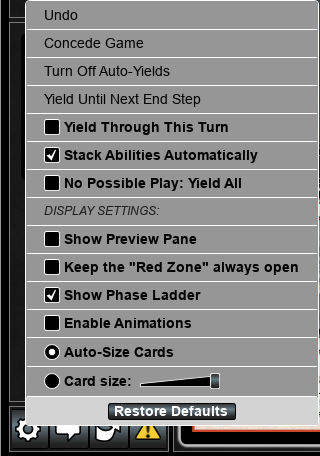
You can still see cards up close. Tick Show Preview Pane in the same menu, or Display Card Preview Window under Card Display, and MTGO shows the card you point at in a pane of its own. It made no difference I could measure.
Collection › Display
2. Use List View in your collection
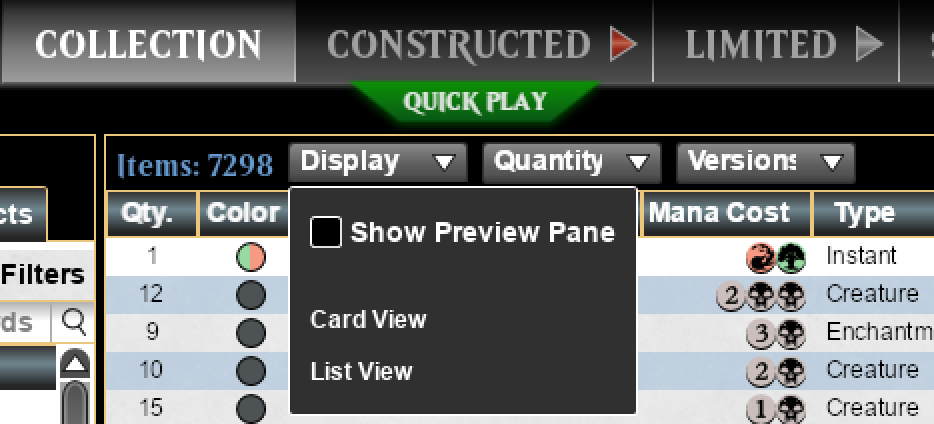
In Card View, MTGO draws a full card image for every card you scroll past, and every image takes memory. That’s why the collection and the deck builder are where MTGO is slowest. List View shows each card as a row of text instead, with how many you have, its name, cost and type, and the collection and the deck builder get much faster. I didn’t measure this one, but it wasn’t really necessary: you’ll see right away that it loads faster.
In the Collection tab, where you build your decks too, open Display above your cards and choose List View.
Unearth › Performance
3. Keep Unearth MTGO on Faster
This one is specific to Unearth MTGO. If you have a lower-end Mac, or just want a faster response and do not care about the blurriness of cards, choose Faster. It is under Unearth › Performance, in the menu bar while MTGO is open.
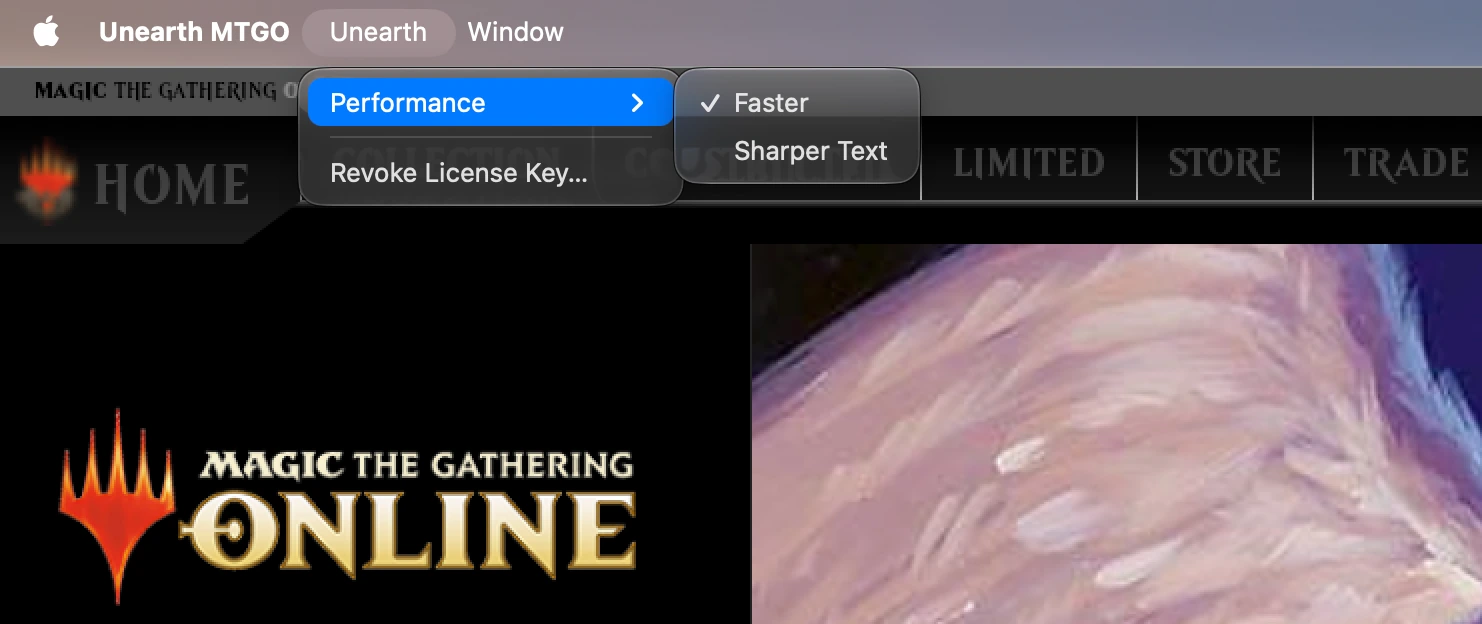
Switching restarts MTGO, so switch between matches. If sharp text matters more to you and your Mac has memory to spare, try Sharper Text, and switch back to Faster if MTGO slows down.
When it lags
Restart MTGO when it gets laggy
These settings make MTGO lighter and smoother, but none of them stop the leaks. MTGO keeps the memory it takes until you quit it, so the best thing you can do is the simplest: when you feel that MTGO is laggy, restart it. No matter what settings you tweak, after some time, depending on your Mac, it will become unusable.
Questions
How much RAM does MTGO need on a Mac?
The minimum is 8 GB. The more, the better. :)
Why do I need to restart MTGO?
Because of memory leaks. A memory leak happens when a program reserves memory from the system but fails to release it back once it is no longer needed. Over time, it compounds.
Running MTGO in a virtual machine?
Parallels or VMware Fusion runs a whole copy of Windows next to MTGO, and it holds a share of your Mac’s RAM while it runs. Unearth MTGO runs MTGO as a Mac app, with no Windows next to it. Every way to play MTGO on a Mac, compared.
$4.99 a month or $49.99 a year. Cancel any time.
More questions? Write to [email protected], or ask on our Discord.